Offline Counsel AI
The AI your firm can actually Trust.
A complete legal workspace that runs on your own hardware or infrastructure.
0+languages
detected and translated
0%
private and secure
0bytes
sent to the cloud
0+ files
processed per query
The Product
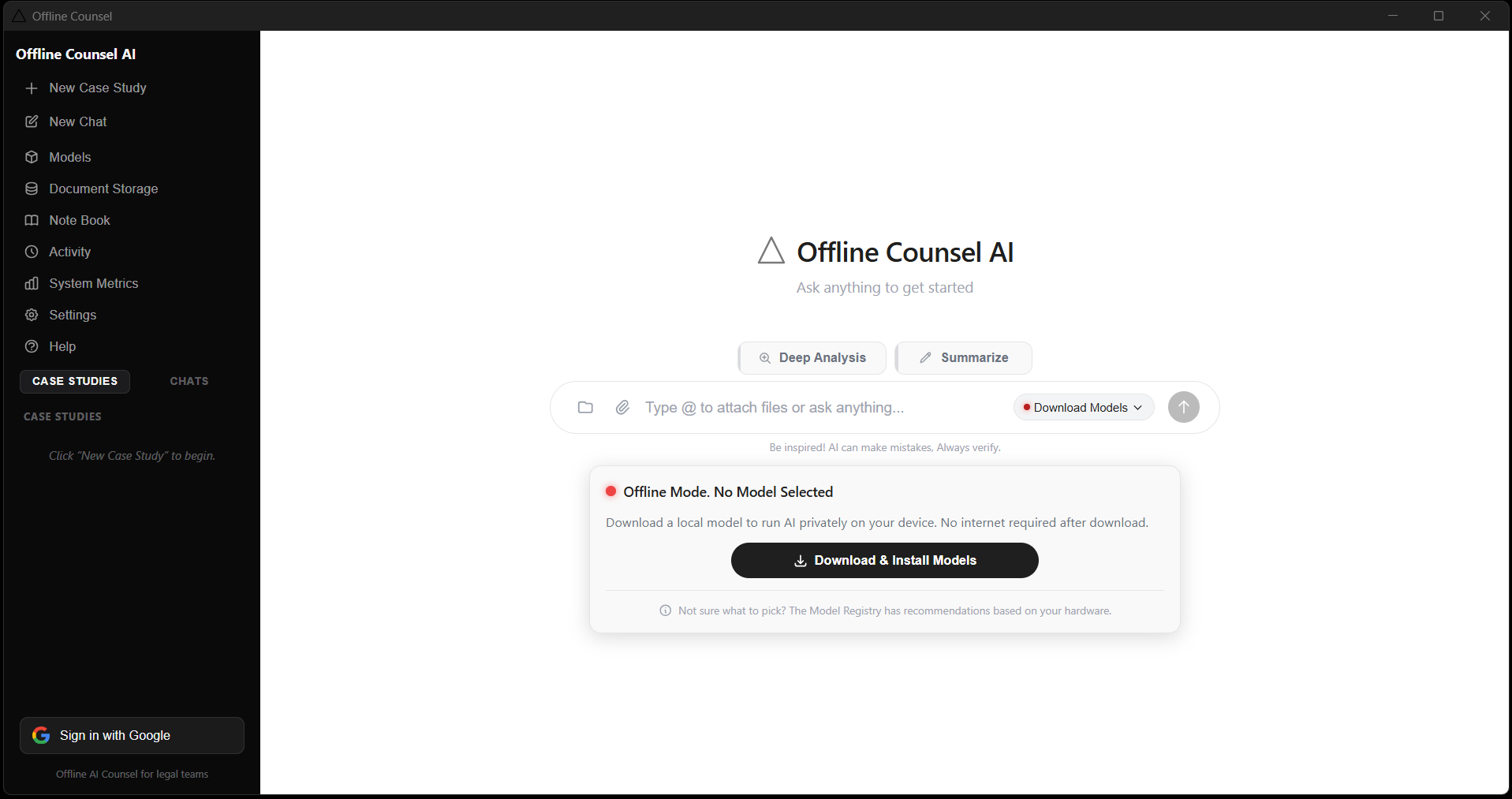
Offline Counsel AI
A desktop-class application for legal practices without a private server or an IT department. Install it, point it at a matter, and work. Available for Windows and macOS.
Product · v0.1.1
The Case for Going Offline
Real objections,
resolved by architecture.
What firms tell us
How we respond
Data Sovereignty
My client contract prohibits cloud processing of case materials.
Zero data egress. Runs entirely on your hardware. There is no cloud vendor to audit.
Attorney-Client Privilege
I used a public chatbot for a memo and now I am worried about privilege waiver.
No tokens leave your device. No training data retention. Privilege preserved by architecture.
Cost Structure
Our firm pays 50,000 a year for e-discovery tools that still require cloud upload.
Perpetual licence. No per-seat pricing. No usage limits.
Governance
Associates are using AI tools without IT approval.
Give them a tool designed to support compliance that they have no reason to hide.
Capabilities
Six tools. One workspace. Nothing leaves.
Offline Counsel is designed to support compliance through its architecture rather than through policy. No connection means no exposure, ever.
Private AI Chat
Converse with a legal-aware AI that understands clauses, citations, Latin terms, and jurisdictional nuance without a single token leaving your device.
Document Intelligence
Drop in contracts, briefs, depositions, or case files. The counsel AI reads, extracts, and reasons over them clause by clause.
Matter Management
Organise every conversation under the right case by client, type, jurisdiction, and date. Everything stays local, always.
Local File Library
A persistent document vault inside the app. Upload once, reference in any conversation, with usage tracking, folder structure, and instant search.
Notebook
A full rich-text editor built into the same workspace. Draft memos, capture notes, and compose client communications without switching apps.
Export and Share
Turn any conversation into a deliverable. Export full transcripts as Word, PDF, or plain text, ready for the client file or the court record.
Modes of Work
Three depths of reading.
Case Analysis
Deep read of a single matter, clause by clause.
- Document type classification
- All parties, roles and defined terms
- Key provisions and operative clauses
- Critical figures, dates and deadlines
- Risk flags and ambiguous language
- Prioritised recommendations
Document Intelligence
Fast orientation on unfamiliar paper.
- Document overview and purpose
- Key parties and relationships
- Core terms and obligations
- Material figures and timelines
- Issues and concerns flagged
- Suggested next steps
Private Chat
Open-ended reasoning with nothing recorded.
- No analytics, no logging
- Zero network calls of any kind
- Hypothetical exploration
- Follow-up questions on documents
- Case strategy development
- Privileged internal reasoning
In Practice
A 40 page lease,
reviewed before coffee.
Five steps from an unopened PDF to a client-ready memo. Every one of them on your own machine.
Create a matter
Open Offline Counsel, choose New Matter, name it Smith Retail Lease Review, set type Contract and jurisdiction New York.
Attach the document
Drop in the 40 page PDF via the paperclip. The app extracts and indexes the full text locally.
Run deep analysis
Select Deep Analysis and send. The AI returns parties, key terms, CAM charges, renewal options, and risk flags clause by clause.
Ask follow-up questions
Switch to Private Chat and ask what is market standard for CAM caps in New York retail leases. The AI reasons over the document context.
Draft and export
Open the Notebook, write the client memo from the analysis, and export as .docx or .pdf.
Memory Index
Your firm's knowledge compounds.
Every matter adds to a permanent, queryable asset that belongs to the firm. The longer you use Offline Counsel, the more it is worth, and none of it is held anywhere else.
Memory Index
Accumulated Legal Knowledge
3,412
Legal precedents indexed
214
Case studies processed
1,089
Documents analysed
0
Bytes transmitted externally
This system has indexed 3,412 legal precedents across 214 case studies.
Privacy Architecture
Layer by layer, there is nowhere for data to go.
Privacy here is not a setting that an administrator can switch off. It is a property of how the system is built.
Inference
llama.cpp runs on local CPU and GPU. No API calls during chat, ever.
Documents
Files are read locally. Content is never transmitted or stored externally.
Conversations
Stored in a local SQLite database on your device only.
API Keys
Held in the OS keychain rather than in plaintext files.
Matter Metadata
Client names, case types and jurisdictions never reach any server.
Network
Used only for the initial model download. Inference requires zero connectivity.
Who It Is For
Built for anyone bound by privilege.
Solo Practitioners
Enterprise capability without an enterprise IT budget.
Litigation Teams
Discovery volume read locally, with no vendor in the chain of custody.
Transactional Attorneys
Diligence and contract review at deal speed.
In-House Counsel
Commercial review that never leaves the corporate network.
Criminal Defence
Case files that stay sealed inside the practice.
Family Law
Sensitive personal matters handled with total discretion.
Model Library
Choose the model. Change it whenever.
Browse and download open-source models inside the app, then switch between them mid session to match the matter in front of you.
Compliance Posture
Designed for the obligations you already carry.
We do not claim certifications we have not earned. What follows is what the architecture is built to support, with formal certification in progress.
ABA Model Rule 1.6
Confidentiality by architecture
Attorney-Client Privilege
Preserved, not merely promised
GDPR
Data stays in jurisdiction
CCPA
No third-party data sharing
SOC 2
Audit-friendly local storage
Bar Association Standards
Ethics-first by design
Private legal intelligence.
Deployed in your environment.
We install Offline Counsel on your own servers or workstations, size the hardware with your IT team, and hand over a system that has no outbound connection to close.